

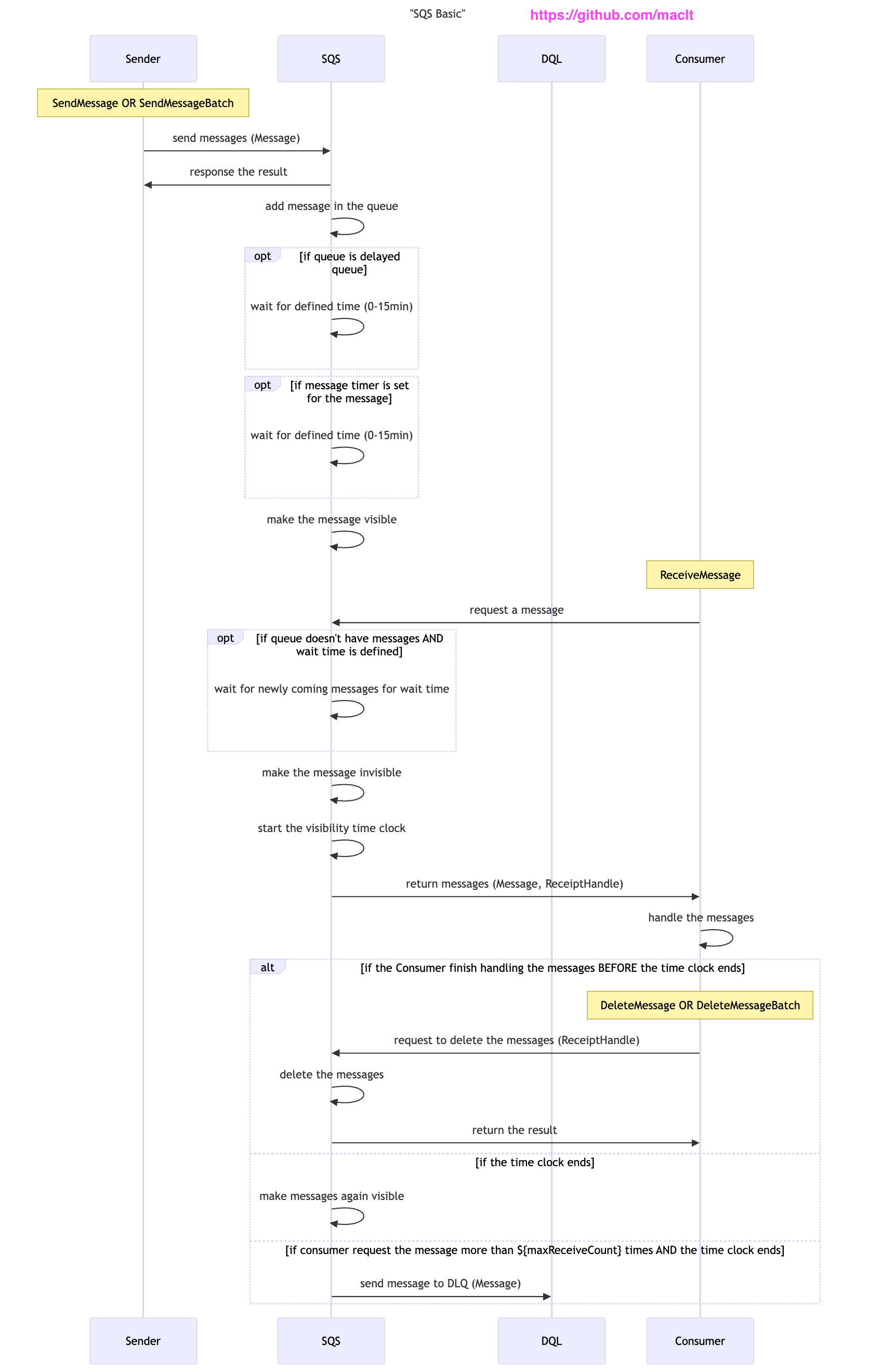
AWS SQS (Simple Queue Service) is a fully managed message queuing service that provides a straightforward yet powerful way to decouple the components of cloud applications.1 Here I share a sequence diagram of SQS.
Sequence
Source code in mermaid syntax is here.
Send Message
First the sender sends the messages to the queue.
After the queue receive the messages, you can set delay before the queue makes the messages visible.
If both the queue-level delay and the message-level timer are used, the delays are additive. The maximum delay in total is 15 min.
For example,
If
DelaySecondsof delayed queue is 3 min andDelaySecondsof message timer is 2 min, the total delay is 5 min.If
DelaySecondsof delayed queue is 10 min andDelaySecondsof message timer is 10 min, the total delay is 15 min, capped by the limitation.
Receive Message
Once the messages are visible, the consumer can receive the message.
The consumer receives not only message but also ReceiptHandle which will be used in the “Delete Message” section.
During the message is handled by the consumer, the message is still stored in the queue but is invisible to the other consumers. The message will be visible again after the VisibilityTimeout duration.4
If the WaitTimeSeconds is configured in ReceiveMessage command, this enables the long polling. If the queue is empty when the queue accepts the ReceiveMessage request, then queue wait for WaitTimeSeconds. Then the queue may have a new message sent from the sender before it returns the response to consumer.56
This reduce the number of unnecessary receive message requests to the queue.
Delete Message
After the consumer finish handling the messages, the consumer is responsible for deleting the message in the queue. When the consumer delete the message by DeleteMessage command, ReceiptHandle is necessary to identify the message to delete.
The delete message has to be executed before the message will be visible in the queue.
Error handling
If the message is not deleted by the consumer before the VisibilityTimeout duration ends, the queue supposes the consumer failed in message handling. Then make the message visible again. This is why SQS is fault tolerant.
If the message is not deleted although it is received again and again, the message is sent to dead letter queue (DLQ) and deleted from the main queue.7
Reference
AWS S3 stands for simple storage service although it’s not simple enough anymore.
https://docs.aws.amazon.com/AWSSimpleQueueService/latest/SQSDeveloperGuide/sqs-delay-queues.html
https://docs.aws.amazon.com/AWSSimpleQueueService/latest/SQSDeveloperGuide/sqs-message-timers.html
https://docs.aws.amazon.com/AWSSimpleQueueService/latest/SQSDeveloperGuide/sqs-visibility-timeout.html
https://docs.aws.amazon.com/AWSSimpleQueueService/latest/SQSDeveloperGuide/sqs-short-and-long-polling.html
WaitTimeSeconds has to be shorter than the TTL of ReceiveMessage request.
https://docs.aws.amazon.com/AWSSimpleQueueService/latest/SQSDeveloperGuide/sqs-dead-letter-queues.html