

The “Basics tutorial” by the official gRPC is not simple for me. So I tried to have an original tutorial as an intermediate step. Here I share the code and its instruction.
Sample code
https://github.com/maclt/sample-grpc 1
Overview
Glossary
gRPC2 … stands for “Google Remote Procedure Call”. Remote Procedure Call is used to enable a client program to executer a function on the remote server.
Protocol Buffer3 … language-neutral, platform-neutral mechanism for serializing structured data. It is binary encoded. The processing speed is very fast and the data amount is smaller compared to human readable format such as JSON.
.proto file … A definition file for protocol buffer. From this file, you can automatically generate the codes to handle protocol buffer data.
Because gRPC uses Protocol Buffer for its data format, good understandings on Protocol Buffer is necessary.
Comparison with REST
There are several clear differences between gRPC and REST (e.g., APIs using HTTP + JSON).
Data Format Differences
REST: Uses JSON (human-readable but results in larger payloads)
gRPC: Uses Protocol Buffers (binary format, faster and more lightweight)
Performance
REST: JSON parsing can be costly and communication tends to be verbose
gRPC: Binary format allows for faster processing and reduced payload size
Interface Definitions
REST: Lacks strict type definitions; often supplemented with OpenAPI or Swagger
gRPC: Clearly defines types and RPC methods using .proto files
Communication Model
REST: Based on request/response (synchronous)
gRPC: Supports request/response as well as bidirectional streaming and asynchronous communication
Language Support
REST: Supported in most programming languages
gRPC: Officially supports many languages (e.g., Go, Python, Java)
Tool Compatibility
REST: Easily testable using common tools like curl or Postman
gRPC: Requires generated client/server code and gRPC-specific tooling
Browser Compatibility
REST: Can be called directly from browsers
gRPC: Not directly supported by browsers; needs gRPC-Web for browser communication
gRPC is well-suited for efficient and scalable communication, especially between microservices. On the other hand, REST remains a strong choice for external integrations and browser-based applications due to its widespread adoption and simplicity.
Steps
Step 1. Prepare environment
Step 2. Define protocol buffer
Step 3. Generate program code from protocol buffer
Step 4. Start the server
Step 5. Call the procedure from the client in Go
Step 6. Call the procedure from the client in Python
Diagram
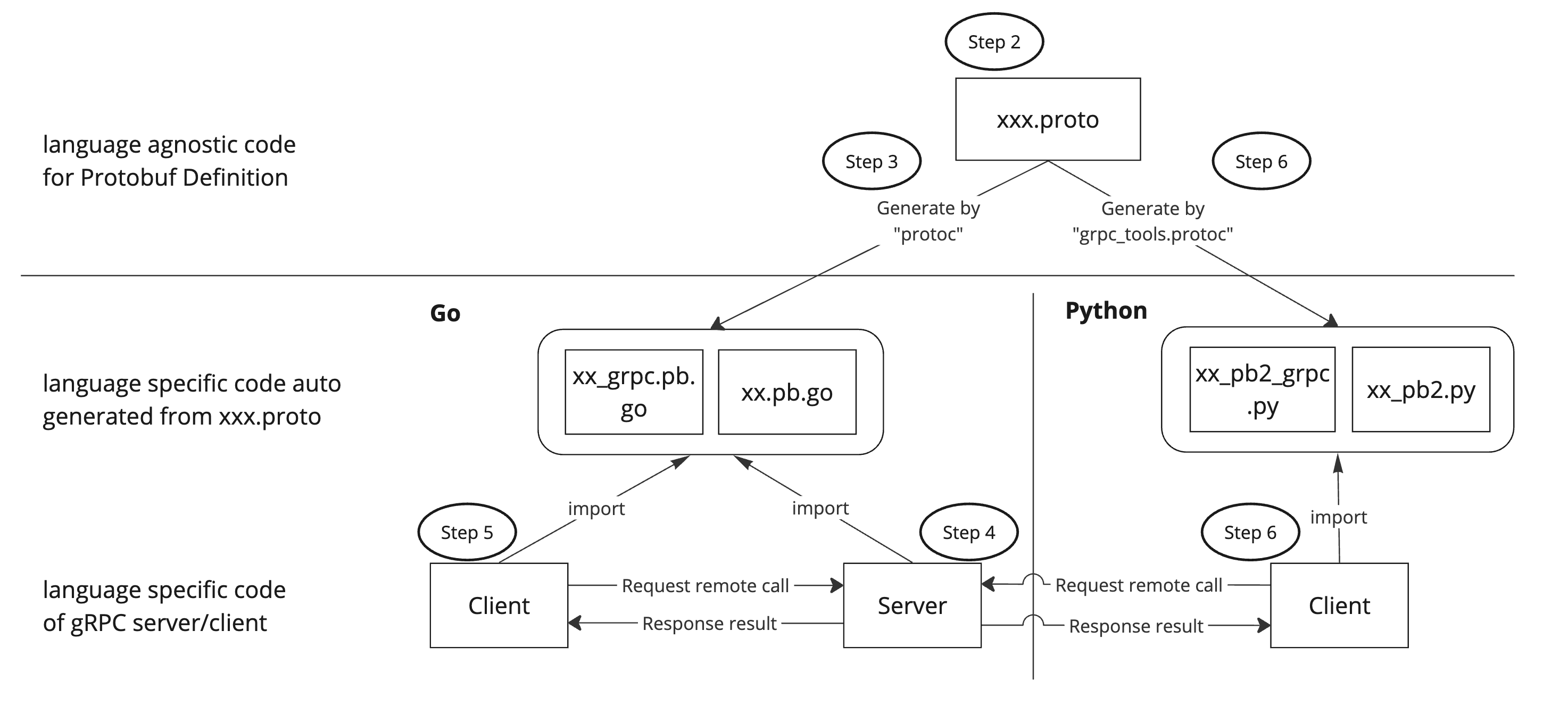
Prerequisites
Go 1.23.3
Python 3.12.8
Step 1. Prepare environment
Install global Go packages
$ go install google.golang.org/protobuf/cmd/protoc-gen-go@latest$ go install google.golang.org/grpc/cmd/protoc-gen-go-grpc@latestYou can check if the packages are correctly installed by these commands.4
$ which protoc-gen-go$ which protoc-gen-go-grpcStep 2. Define protocol buffer
Create location.proto file and define protocol buffer.
📄 location.proto
// latest version of Protocol Buffer
syntax = "proto3";

// Protobuf namespaces
package location;

// Go specific, specifying Go package paths and names
option go_package = "maclt/sample-grpc/location/location";


// Define RPC
service Location {
  // return a Feature at a given Point
  rpc GetFeature(Point) returns (Feature) {}
}

// define the type of message interface
message Point {
  float lat = 1;
  float lng = 2;
}

message Feature {
  string name = 1;
  string country = 2;
}
One counter intuitive point here is that “float lat = 1” doesn’t mean assigning value 1 to the variable lat. This code defines the field’s name, type and identifier.
int32… field typelat… field name1… field number5
Step 3. Generate program from protocol buffer
$ protoc --go_out=./go/location --go_opt=paths=source_relative \
    --go-grpc_out=./go/location --go-grpc_opt=paths=source_relative \
    ./location.proto
This command generates 2 files.
go/location/location.pb.gogo/location/location_grpc.pb.go
These files are implemented in Go and generated based on the .proto file in the previous step.
location.pb.go
This file responsible for the implementation of protocol buffer schemas. For example, message interface in .proto file is translated into struct of Go.
📄 location.pb.go
// define the type of message interface
type Point struct {
        ...
	Lat float32 `protobuf:"fixed32,1,opt,name=lat,proto3" json:"lat,omitempty"`
	Lng float32 `protobuf:"fixed32,2,opt,name=lng,proto3" json:"lng,omitempty"`
}
location_grpc.pb.go
This file imports location.pb.go and provides for gRPC features. In this file, you see server and client implementations of gRPC.
📄 location_grpc.pb.go
// Define RPC
type LocationClient interface {
	// return a Feature at a given Point
	GetFeature(ctx context.Context, in *Point, opts ...grpc.CallOption) (*Feature, error)
}
// Define RPC
type LocationServer interface {
// return a Feature at a given Point
GetFeature(context.Context, *Point) (*Feature, error)
mustEmbedUnimplementedRouteGuideServer()
}Step 4. Start the server
Before you start the server, please download necessary packages.
$ go mod downloadThen you are ready to start the gRPC server.
$ cd go/server$ go run server.goYou’ll see output
2024/12/15 16:37:31 gRPC server listening on port 50051
Step 5. Call the procedure from the client in Go
As a next step, let’s run the client code and call the server.
$ cd go/client$ go run client.goYou’ll see the output
2024/12/15 16:37:46 Feature received: Tokyo Tower in Japan
The CLI process which is running the server shows
2024/12/15 16:37:46 Received request for Point: 35.65861, 139.74544
client.go
In the go/client/client.go code, GetFeature function is called which was defined in .proto file.
📄 client.go
point := &pb.Point{Lat: 35.65861098290943, Lng: 139.74543289643074}
feature, err := client.GetFeature(ctx, point)
log.Printf("Feature received: %s", feature.Name+" in "+feature.Country)
Step 6. Call the gRPC from the client in Python
Because .proto file is language neutral, this can be converted into Python as well. You don’t need to define it again for different languages. Start a new command line at the project root.
$ pip install grpcio-tools$ python -m grpc_tools.protoc \
--proto_path=. \
--python_out=./python/location \
--grpc_python_out=./python/location \
./location.protoThis command generates 2 files.
python/location/location_pb2.pypython/location/location_pb2_grpc.py
I prepared a Python client to call the server in the Step 4.
$ cd python$ python client.pyYou’ll see output
-------------- GetFeature --------------
Feature received 'Tokyo Tower' in Japan
The CLI process which is running the server shows
2024/12/15 16:37:46 Received request for Point: 35.65861, 139.74544
Main References
Please try the command below if you cannot find protoc-gen-go or protoc-gen-go-grpc.
$ export PATH="$PATH:$HOME/go/bin"I feel this syntax is a little bit counter intuitive. Here is further explanation.